{/* Google tag (gtag.js) */} SecTemple: hacking, threat hunting, pentesting y Ciberseguridad
Showing posts with label pc security. Show all posts

Dominating Your Digital Fortress: The Ultimate Blueprint to Detect a Hacked PC


Lección 1: Mission Briefing: The Silent Intruder

In the shadows of the digital realm, threats evolve at an alarming pace. Your personal computer, a repository of invaluable data and a gateway to your digital life, is a prime target. The chilling reality is that an intrusion might already be underway, operating beneath your notice. This dossier is designed not to incite fear, but to equip you with actionable intelligence. We will dissect the subtle, and not-so-subtle, indicators that your PC has been compromised. Forget the sensationalism; this is about practical, empirical detection methods used by cybersecurity professionals. Prepare to gain the knowledge to identify threats, understand their modus operandi, and implement immediate defenses. This is your first operational step in securing your digital perimeter.

Lección 2: Red Flags in Plain Sight: Common Signs of a Compromised PC

Your computer's behavior is its primary communication channel. Deviations from normal operation are often the first, albeit cryptic, signals of an intrusion. Recognizing these malware signs is crucial for early detection. Here are the most common indicators that your PC may be compromised:

  • Sudden Performance Degradation: Is your PC inexplicably slow? Applications taking ages to load, system freezing, or extreme sluggishness during normal tasks can indicate that malicious software is consuming your system's resources (CPU, RAM, Disk I/O). This is a classic symptom of background processes running without your knowledge.
  • Unexplained Pop-ups and Advertisements: Encountering persistent pop-up ads, even when you're not browsing the web, is a strong indicator of adware or potentially more malicious software. These can range from annoying to outright deceptive, attempting to trick you into downloading more malware.
  • Unexpected System Behavior: Programs launching or closing on their own, settings changing without your input (e.g., browser homepage, search engine), or the appearance of unfamiliar icons and toolbars are significant red flags. Hackers often modify system configurations to facilitate their access or spread their malicious payload.
  • Network Activity Spikes: An unusual increase in your internet bandwidth usage, especially when you're not actively downloading or streaming, can signal that your PC is part of a botnet, sending out spam, participating in DDoS attacks, or exfiltrating data.
  • Antivirus/Firewall Disablement: If your security software suddenly stops working, is disabled, or cannot be updated, this is a critical sign. Malware often targets security defenses to maintain its presence and evade detection.
  • Strange Error Messages: While some errors are benign, a sudden influx of unusual or cryptic error messages, especially those related to system files or security, warrants investigation.
  • Suspicious Disk Activity: Your hard drive light constantly blinking or excessive disk activity when the computer should be idle can indicate that malware is actively reading, writing, or encrypting files.
  • Account Issues & Strange Emails: If your online accounts start exhibiting unusual activity (e.g., sent emails you didn't write, password reset requests) or friends report receiving spam from your email address, your PC might be compromised and used for further attacks.

These symptoms are not definitive proof, but they are critical intelligence requiring immediate investigation. Identifying these computer virus symptoms is the first step in understanding if your system is under attack.

Lección 3: Under the Hood: How Malware Operates and Persists

Understanding the adversary's tactics is paramount to effective defense. Malware isn't just a passive virus; it's often sophisticated software designed for specific objectives, such as data theft, system control, or financial gain. Here’s a glimpse into how malicious software operates and maintains its foothold:

  • Initial Foothold: Exploitation & Social Engineering: Hackers gain access through various vectors:
    • Exploiting Vulnerabilities: Unpatched software (operating systems like Windows, browsers, plugins) presents security holes (CVEs) that malware can exploit to gain entry.
    • Malicious Downloads: Tricking users into downloading infected files disguised as legitimate software, documents, or updates.
    • Phishing/Spear-Phishing: Deceptive emails or messages containing malicious links or attachments.
    • Drive-by Downloads: Compromised websites that automatically download malware onto a visitor's system without explicit user interaction.
  • Execution and Privilege Escalation: Once inside, malware executes its payload. Often, it will attempt to gain higher privileges (administrator rights) to gain deeper control over the system, bypass security controls, and modify critical system settings.
  • Persistence Mechanisms: How Hackers Maintain Persistence: This is key to ensuring the malware survives reboots and basic cleanup attempts. Common techniques include:
    • Registry Run Keys: Adding entries to the Windows Registry that automatically launch malware upon system startup.
    • Scheduled Tasks: Creating scheduled tasks that trigger the malware execution at specific intervals or system events.
    • Service Creation: Registering the malware as a legitimate Windows service, allowing it to run in the background.
    • Rootkits: Highly sophisticated malware that hides its presence and other malicious activities from the operating system and security software by modifying core system components.
    • WMI Persistence: Utilizing the Windows Management Instrumentation (WMI) framework to trigger malicious scripts or executables.
  • Lateral Movement & Command and Control (C2): Once established, malware might move to other systems on the network (lateral movement). It often establishes a communication channel to a Command and Control (C2) server, allowing the attacker to issue commands, receive stolen data, and update the malware remotely.
  • Data Exfiltration or Objective Execution: The ultimate goal is achieved – data is stolen (credentials, financial information, sensitive documents), systems are encrypted (ransomware), or the system is used for malicious purposes (botnets, crypto-mining).

Understanding these how hackers access your PC methods helps in identifying the subtle traces they leave behind.

Lección 4: The Analyst's Toolkit: Essential Resources for Detection

As an ethical operative, your arsenal must be precise and effective. These tools and resources are invaluable for diagnosing potential compromises and understanding system integrity. Treat them as part of your standard operating procedure:

  • Windows Sysinternals Suite: A powerhouse collection of utilities for managing, troubleshooting, and diagnosing Windows systems. Tools like Process Explorer, Autoruns, and TCPView are indispensable for monitoring running processes, startup programs, and network connections in real-time.
    Resource: Microsoft Sysinternals
  • Malwarebytes Scanner: A highly effective anti-malware solution known for its ability to detect and remove a wide range of threats, including advanced malware that traditional antivirus might miss. Run a full system scan.
    Resource: Malwarebytes
  • VirusTotal: An invaluable free service that analyzes files and URLs for malware using multiple antivirus engines and website scanners. If you suspect a specific file or website, upload it here for a comprehensive analysis.
    Resource: VirusTotal
  • NIST Cybersecurity Framework: While not a detection tool itself, understanding the principles and guidelines from NIST provides a robust framework for assessing and improving your overall security posture. It helps contextualize your findings.
    Resource: NIST Cybersecurity Framework
  • Online Security Forums & Threat Intel Feeds: Staying updated on the latest threats and vulnerabilities is critical. Follow reputable cybersecurity news outlets and participate in expert forums.

Leveraging these resources is key to performing accurate spyware detection and identifying other malicious software.

Lección 5: Fortifying Your System: Immediate Security Steps

Detection is only half the battle. Once a potential compromise is identified, immediate action is required to secure your system and mitigate further damage. These are essential windows security tips and immediate actions:

  • Isolate the System: Immediately disconnect the compromised PC from the internet (unplug Ethernet cable, disable Wi-Fi). If it's a network, isolate it from other devices to prevent lateral movement.
  • Run a Full Antivirus/Antimalware Scan: Use your installed security software and consider a second opinion with tools like Malwarebytes. Ensure definitions are up-to-date.
  • Check Startup Programs and Services: Use tools like Autoruns (from Sysinternals) to meticulously review all programs and services that launch on startup. Disable anything suspicious or unrecognized.
  • Review Browser Extensions and Installed Programs: Uninstall any unfamiliar or unnecessary browser extensions and applications.
  • Change Critical Passwords: If you suspect a compromise, change passwords for all critical online accounts (email, banking, social media) from a *different, trusted* device. Enable Two-Factor Authentication (2FA) wherever possible.
  • Update Everything: Ensure your operating system, browser, and all installed applications are fully patched and up-to-date. This closes known vulnerabilities.
  • Consider a System Reset/Reformat: For significant or persistent infections, the most secure course of action is often to back up essential personal data (and scan it thoroughly!), then perform a clean install of your operating system. This ensures all traces of malware are removed.

Implementing these cybersecurity for beginners steps can significantly bolster your defenses against common threats, including ransomware symptoms.

Lección 6: Comparative Analysis: Your PC vs. The Threat Landscape

The digital battlefield is dynamic. Understanding how common threats stack up against your defenses is crucial. Here’s a comparative look at typical threats:

  • Standard Antivirus vs. Advanced Malware: Traditional antivirus excels at detecting known malware signatures. However, modern threats often employ polymorphic code, fileless techniques, or zero-day exploits that can evade signature-based detection. This is where on-demand scanners like Malwarebytes and behavioral analysis tools become critical.
  • PC Security vs. Cloud Security: While securing your local PC is vital, a comprehensive strategy now includes cloud security. Services like Microsoft Defender for Endpoint or cloud-based firewalls offer centralized management, advanced threat intelligence, and protection across multiple devices and networks. Relying solely on endpoint security is no longer sufficient in a hybrid environment.
  • Manual Checks vs. Automated Threat Hunting: Manually sifting through logs and processes can be time-consuming and error-prone. Modern security solutions often incorporate automated threat hunting capabilities, leveraging AI and machine learning to identify suspicious activities and anomalies far faster and more accurately than human analysts alone.
  • Basic User Awareness vs. Zero Trust Architecture: Basic user awareness training is a foundation. However, a Zero Trust model, which assumes no user or device can be implicitly trusted, offers a more robust security paradigm. It involves continuous verification of identity and device health before granting access to resources, significantly reducing the attack surface even if an endpoint is compromised.

The threat landscape is constantly evolving. Relying on a single layer of defense is akin to leaving your fortress gates wide open. A multi-layered approach, combining robust endpoint security, vigilant monitoring, and proactive patching, is essential.

Lección 7: Debriefing: Your Actionable Intelligence

You've now assimilated the intelligence required to identify if your digital fortress has been breached. The signs are there, the methods are understood, and the tools are at your disposal. This isn't about living in constant paranoia, but about operating from a position of informed strength.

Your Mission: Execute, Share, and Debate

The knowledge gained here is a weapon in your arsenal. Deploy it wisely.

  • Execute: Implement the security steps immediately. Run the scans. Review your startup programs. Fortify your defenses.
  • Share: If this dossier has provided clarity or saved you from potential disaster, disseminate this intelligence. Share it within your professional network. A well-informed community is a more resilient community. The digital realm demands collective vigilance.
  • Debate: What are your experiences? Have you encountered sophisticated hacking tools or unique cyberattack vectors? Share your insights, questions, or additional cybersecurity tips in the comments below. Your input fuels our collective intelligence.

Debriefing of the Mission

The battle for digital security is ongoing. Stay vigilant, stay informed, and continue to hone your skills. The digital frontier is yours to secure.

About The Author

The Cha0smagick is a seasoned digital operative and polymathematics engineer with extensive experience in the trenches of cybersecurity and system analysis. Specializing in dissecting complex systems and transforming raw data into actionable intelligence, The Cha0smagick provides definitive blueprints and comprehensive guides for fellow operatives navigating the digital landscape.

json [ { "@context": "https://schema.org", "@type": "BlogPosting", "mainEntityOfPage": { "@type": "WebPage", "@id": "YOUR_POST_URL" }, "headline": "Dominating Your Digital Fortress: The Ultimate Blueprint to Detect a Hacked PC", "image": [], "datePublished": "YYYY-MM-DD", "dateModified": "YYYY-MM-DD", "author": { "@type": "Person", "name": "The Cha0smagick", "url": "YOUR_AUTHOR_PROFILE_URL" }, "publisher": { "@type": "Organization", "name": "Sectemple Dossiers", "logo": { "@type": "ImageObject", "url": "YOUR_LOGO_URL" } }, "description": "Discover the critical signs your PC is hacked. This comprehensive guide details malware behavior, red flags, and essential tools for detection and security. Operate with confidence." }, { "@context": "https://schema.org", "@type": "BreadcrumbList", "itemListElement": [ { "@type": "ListItem", "position": 1, "name": "Home", "item": "YOUR_HOMEPAGE_URL" }, { "@type": "ListItem", "position": 2, "name": "Cybersecurity", "item": "YOUR_CATEGORY_PAGE_URL" }, { "@type": "ListItem", "position": 3, "name": "Dominating Your Digital Fortress: The Ultimate Blueprint to Detect a Hacked PC" } ] }, { "@context": "https://schema.org", "@type": "HowTo", "name": "Detecting a Hacked PC: A Step-by-Step Operational Guide", "step": [ { "@type": "HowToStep", "name": "Understand the Threat Landscape", "text": "Recognize that your PC is a target and understand common intrusion methods and malware behavior." }, { "@type": "HowToStep", "name": "Identify Red Flags", "text": "Look for common signs like performance degradation, pop-ups, unexpected behavior, and network spikes." }, { "@type": "HowToStep", "name": "Utilize Analyst Tools", "text": "Employ resources like Sysinternals Suite, Malwarebytes, and VirusTotal for in-depth analysis." }, { "@type": "HowToStep", "name": "Implement Immediate Security Measures", "text": "Isolate the system, run scans, check startup items, change passwords, and update software." }, { "@type": "HowToStep", "name": "Consider Advanced Security", "text": "Explore multi-layered defenses, automated threat hunting, and Zero Trust principles." } ] } ]

Trade on Binance: Sign up for Binance today!

Mastering PC Security: The 1-Minute Hack Detection Blueprint


In the shadowy alleys of the digital realm, vigilance is the operative word. As an operative, your primary defense is awareness. This dossier, codenamed "The 1-Minute Hack Detection Blueprint," is designed to equip you with the essential fieldcraft to identify potential compromises on your personal computer swiftly and effectively. Forget arcane rituals or expensive software; we're leveraging built-in intelligence and core diagnostic techniques. When your system exhibits erratic behavior – phantom program executions, inexplicable performance degradation, or the unsettling appearance of unfamiliar account credentials – it’s not paranoia; it's a signal. It's time to deploy these rapid assessment protocols.

Leveraging Windows MRT: Your First Line of Defense

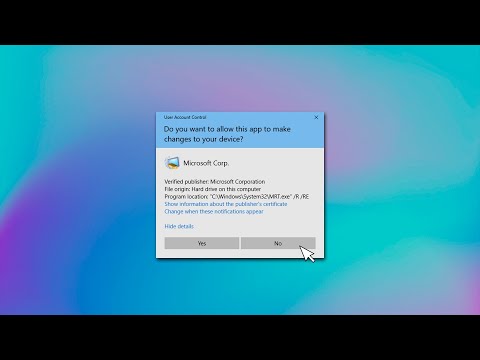
Every operative needs a reliable scanner. Windows includes a potent, albeit often overlooked, tool: the Microsoft Support Diagnostic Tool (MRT), also known as the Malicious Software Removal Tool. This built-in utility is your digital scalpel for performing rapid malware assessments.

Operational Procedure:

  • Press Windows Key + R to open the Run dialog.
  • Type mrt and press Enter.
  • The tool will launch, guiding you through a quick scan. This is designed to be efficient, catching common threats without significant system overhead.

This initial scan is crucial. It’s the equivalent of a perimeter check, identifying immediate threats that may have bypassed your primary antivirus defenses. Think of it as a quick visual sweep of the compound before initiating a more thorough investigation.

Strategic Scanning: Quick vs. Full Scans

Understanding when to employ a quick scan versus a full system scan is paramount for efficient threat hunting. The MRT, like most antivirus solutions, offers both:

  • Quick Scan: Focuses on the most common locations where malware hides (registry, critical system files, active processes). Ideal for rapid, daily checks when you suspect minor issues or want routine assurance.
  • Full Scan: A comprehensive sweep of your entire hard drive. This is resource-intensive and time-consuming but necessary for deep-seated infections or after a quick scan flags a potential issue.

Deployment Logic: If your system feels sluggish, or you’ve noticed unusual pop-ups, initiate a quick scan first. If MRT flags any malicious software, immediately schedule a full scan. This methodical approach conserves resources while ensuring thoroughness.

Identifying Infiltrators: Unknown User Accounts

A compromised system often harbors new "residents." Attackers frequently create their own user accounts to maintain persistent access, bypass security measures, or conduct further operations. Identifying these unauthorized accounts is a critical step.

Operational Procedure:

  • Press Windows Key + R, type lusrmgr.msc, and press Enter (Note: This is not available on Windows Home editions. Use Command Prompt with net user for broader compatibility).
  • Navigate to the "Users" folder.
  • Scrutinize the list for any accounts you did not create or recognize. Be wary of unusual naming conventions or accounts with administrative privileges that you don't recall setting up.
  • For Command Prompt users: Open Command Prompt as Administrator and type net user. Review the output for unfamiliar usernames.

Action Protocol: If an unknown user account is detected, it is a red flag demanding immediate action. Select the account and choose the option to delete it. This is one of the most definitive indicators of a system breach.

Disabling Silent Threats: Suspicious Startup Applications

Malware often seeks to establish persistence by launching automatically when your PC boots. These rogue applications can operate silently in the background, siphoning data, employing spyware, or creating backdoors.

Operational Procedure:

  • Press Ctrl + Shift + Esc to open the Task Manager.
  • Navigate to the "Startup" tab.
  • Review the list of applications that launch automatically. Pay close attention to entries with unfamiliar names, publishers you don't recognize, or those with a high "Startup impact."

Mitigation Strategy: If you encounter an application that seems suspicious or unverified, right-click on it and select "Disable." This prevents it from running the next time the system starts, effectively cutting off a potential entry point for attackers and reducing unnecessary background activity.

The Operative's Arsenal: Essential Tools & Resources

While built-in tools are powerful, a well-equipped operative understands the landscape of available resources. For continuous security and deeper analysis, consider the following:

  • Advanced Malware Scanners: Tools like Malwarebytes offer more heuristic analysis and broader detection capabilities than built-in scanners.
  • System Monitoring Tools: Utilities like Process Explorer (Sysinternals Suite) provide granular insight into running processes and network connections, helping to spot anomalies.
  • Reputable Antivirus Suites: A robust, up-to-date antivirus solution from a trusted vendor (e.g., Bitdefender, ESET, Sophos) is your foundational defense.
  • Security Blogs and Feeds: Staying informed about the latest threats and vulnerabilities is crucial. Follow reputable cybersecurity news outlets and threat intelligence feeds.
  • Consider diversifying your digital assets and exploring secure online financial tools. Platforms like Binance offer a wide range of services for managing digital wealth responsibly.

Comparative Analysis: DIY Checks vs. Professional Suites

The quick checks outlined in this blueprint are invaluable for immediate assessment. However, they are not a substitute for comprehensive security solutions.

  • DIY Checks (MRT, Task Manager, User Accounts):
    • Pros: No cost, readily available, excellent for rapid initial assessment, low system impact.
    • Cons: Limited detection capabilities for advanced threats, requires manual execution, less proactive.
  • Professional Antivirus/Antimalware Suites:
    • Pros: Real-time protection, advanced heuristic and behavioral analysis, automatic updates, proactive threat blocking, often includes features like firewalls and VPNs.
    • Cons: Can incur subscription costs, may have a higher system resource impact, requires proper configuration.

Veredict: For critical systems and continuous protection, a professional security suite is indispensable. The DIY methods serve as a vital supplementary check, a quick "gut feeling" diagnostic when immediate action is required.

Frequently Asked Questions

Q1: Can these steps detect all types of hacks?
A1: These steps are designed for rapid detection of common compromise indicators. Advanced, stealthy attacks might evade these quick checks. A full, professional security audit is recommended for high-security environments.

Q2: What should I do if the MRT finds malware?
A2: Follow the MRT's prompts for removal. If the infection is significant, consider running a full scan with your primary antivirus software, booting into Safe Mode, or seeking professional assistance.

Q3: Is it safe to delete unknown user accounts?
A3: Generally, yes, if you are certain they are not legitimate accounts you created. However, if you are unsure, investigate further before deleting. Persistent unknown administrative accounts are a strong sign of compromise.

About The Cha0smagick

The Cha0smagick is a veteran digital operative, a polymath engineer, and an ethical hacker with extensive experience in the trenches of cybersecurity. Known for their pragmatic, analytical approach, they specialize in dissecting complex systems and transforming raw technical data into actionable intelligence. This dossier is a product of countless hours spent auditing, defending, and understanding the intricate workings of the digital frontier.

Your Mission: Execute, Share, and Debrief

These rapid assessment techniques are your first line of defense. Implementing them regularly can save you from significant digital breaches. If this blueprint has equipped you with the confidence and clarity to secure your digital perimeter, share this intelligence within your professional network. A well-informed operative strengthens the entire network.

What threat reconnaissance techniques do you employ? Which suspicious startup application has caught your eye recently? Share your insights and any lingering questions in the comments below. Your input is vital for refining our operational tactics.

Mission Debriefing

This concludes the operational training for the 1-Minute Hack Detection Blueprint. Stay vigilant, stay informed, and remain secure.

Trade on Binance: Sign up for Binance today!

TLauncher: The Malware Lurking in Your System

The digital world is a shadowy alley, full of whispers and hidden doors. Systems hum with a false sense of security, while beneath the surface, code writhes. Today, we're not just discussing a piece of software; we're dissecting a ghost that might already be haunting your machine. TLauncher. The name itself might evoke images of modded Minecraft and gaming freedom. But underneath that veneer of utility, a darker reality has surfaced, one that every defender, every user, needs to understand. We're about to pull back the curtain on TLauncher and expose the malware that has infiltrated countless systems.

This isn't about pointing fingers; it's about understanding the anatomy of a threat. Knowing how these compromises happen is the first step towards building a fortress. Let's dive into the code, the detection, and the silent defense.

Table of Contents

TLauncher: Beyond the Game

TLauncher, for many, was simply a convenient way to access and manage different versions of Minecraft, along with a plethora of mods. It presented itself as a community-driven tool, a gateway to an enhanced gaming experience. The allure was undeniable: ease of use, access to a vast library of modifications, and the promise of an uninterrupted gaming flow. But convenience, especially in the digital realm, often comes with a hidden price tag. The creators of such tools operate in a gray area, balancing user demands with the often-unseen responsibilities of security. In this case, that balance was catastrophically skewed.

The illusion of a helpful utility began to crumble when security researchers and vigilant users started noticing anomalies. Software that should have been benign was exhibiting behaviors that raised red flags. This is where the real work begins – not for the casual gamer, but for the threat hunter, the analyst, the defender. We must peel back the layers of perceived functionality to expose the underlying malicious intent or, at the very least, severe negligence.

The Unveiling: What Was Found

Reports started trickling in, then flooding the security forums and developer communities. TLauncher wasn't behaving as expected. The initial findings were alarming: the software was found to be bundling and distributing information-stealing malware. This wasn't a subtle backdoor; it was a direct assault on user data. Researchers identified specific payloads designed to exfiltrate sensitive information, including credentials, browsing data, and potentially cryptocurrency wallet details. The very tool that promised to enhance one's digital playground had become a Trojan horse, a delivery mechanism for cybercriminals.

The implications are profound. Users who installed TLauncher, trusting it for its gaming utility, unknowingly opened their systems to attackers. This highlights a critical vulnerability in the software supply chain – how even seemingly innocuous applications can become vectors for widespread compromise. The malware wasn't just a theoretical threat; it was actively harvesting data from unsuspecting victims.

Anatomy of a Compromise: How Did It Happen?

Understanding the 'how' is paramount for building effective defenses. In the case of TLauncher, the primary attack vector appears to be the distribution of malicious payloads embedded within the legitimate installer or subsequent updates. Attackers leverage the trust users place in popular software to bypass initial security measures. When a user downloads and installs TLauncher, they are, in effect, inviting the malware in. The malicious code is often disguised, making it difficult for basic antivirus solutions to detect immediately. It might be obfuscated, packed, or delivered in stages, only activating its malicious routines after installation.

This method is a classic example of social engineering combined with malware distribution. The software's popularity and perceived utility serve as the bait. Once installed, the malware can perform various nefarious actions, from stealing cookies and session tokens to capturing keystrokes and systematically harvesting credentials stored in browsers or other applications. The goal is to gain persistent access and extract as much valuable data as possible before detection.

"The easiest way to break into a system is to have the owner invite you in. And what better invitation than a tool they already trust?" - cha0smagick

Defensive Measures: Hunting the Ghost

Detecting a threat like the one TLauncher harbored requires a proactive, multi-layered approach. While standard antivirus might eventually catch it, advanced threat hunting relies on recognizing anomalous behavior. Here's how an analyst would approach detecting such a compromise:

  1. Log Analysis: Scrutinize system logs for unusual process execution, network connections to suspicious IP addresses, or unexpected file modifications. Look for processes spawned by TLauncher that deviate from its expected behavior.
  2. Network Traffic Monitoring: Observe network activity originating from the TLauncher process. Is it communicating with known command-and-control (C2) servers? Is it exfiltrating data to unusual domains or IP ranges? Tools like Wireshark or network intrusion detection systems (NIDS) are invaluable here.
  3. Endpoint Detection and Response (EDR): EDR solutions can monitor process behavior, file system changes, and registry modifications in real-time. They can flag suspicious activities associated with the TLauncher executable or its associated components.
  4. Memory Forensics: In suspected cases, a memory dump can reveal actively running malicious code that might not be persistently stored on disk. This allows for the analysis of unpacked malware and in-memory artifacts.
  5. Behavioral Analysis: Beyond signature-based detection, observe the overall behavior of the system after TLauncher installation. Are there increased disk I/O, abnormal CPU usage, or unexpected pop-ups?

For instance, a threat hunter might look for a process named `tlauncher.exe` spawning a child process like `powershell.exe` with encoded commands, or attempting to access sensitive files in user directories. A network rule might flag connections to newly registered domains or IPs associated with known malware families.

Fortifying the Perimeter: Your Defense Plan

Once a threat is identified, or even as a preventative measure, robust mitigation strategies are essential. The goal is to eliminate the threat and prevent recurrence. For TLauncher and similar compromises, the steps are clear and decisive:

  1. Uninstall TLauncher Immediately: This is the first and most critical step. Remove the application and any associated components from your system.
  2. Run Comprehensive Malware Scans: Utilize reputable antivirus and anti-malware software. Consider using specialized tools for deep scanning. Update your security software's definitions before running the scan.
  3. Change All Passwords: Assume that any credentials stored or used on the compromised system may have been exposed. This includes email accounts, social media, banking credentials, and gaming accounts. Prioritize changing passwords for critical accounts first.
  4. Review and Revoke Permissions: Check application permissions and revoke any that seem unnecessary or suspicious.
  5. Secure Your Download Sources: Stick to official, trusted sources for all software downloads. Be wary of third-party download sites, unofficial launchers, or pirated software, as these are common distribution channels for malware.
  6. Implement Multi-Factor Authentication (MFA): Enable MFA wherever possible. This adds a critical layer of security, as even if your password is stolen, the attacker will still need the second factor, typically a code from your phone.
  7. Regular System Audits: Conduct periodic checks of installed software and running processes. Knowledge of what *should* be on your system is your first line of defense against what *shouldn't*.

Engineer's Verdict: Trust and the Digital Frontier

TLauncher's foray into malware distribution serves as a stark reminder of the inherent risks in the digital ecosystem. While the intention might have been to provide a convenient platform, the execution resulted in a significant breach of user trust and security. My verdict is clear: **Avoid TLauncher and similar unofficial launchers entirely.** The convenience they offer is not worth the risk of compromising your personal data, financial information, or system integrity.

In the cybersecurity world, trust is a currency that, once lost, is incredibly hard to earn back. Applications that operate in legal or ethical gray areas, or those that fail to implement robust security practices, should be treated with extreme suspicion. Rely on official sources, verified software, and maintain a diligent security posture. The gaming world, like any other digital frontier, demands vigilance.

Operator's Arsenal: Tools for Vigilance

To effectively combat threats like the TLauncher incident and maintain a secure digital environment, an operator needs the right tools. This isn't about having the most expensive gear, but the most effective and well-understood arsenal:

  • Endpoint Detection and Response (EDR) Systems: Solutions like CrowdStrike Falcon, Microsoft Defender for Endpoint, or SentinelOne provide real-time threat detection and response capabilities beyond traditional antivirus.
  • Network Monitoring Tools: Wireshark for deep packet inspection, Zeek (formerly Bro) for network security monitoring, and Suricata for intrusion detection/prevention are essential for observing network traffic for anomalies.
  • Log Management and SIEM Systems: Tools like Splunk, ELK Stack (Elasticsearch, Logstash, Kibana), or Graylog are critical for aggregating, searching, and analyzing logs from various sources to identify suspicious patterns.
  • Malware Analysis Sandboxes: Cuckoo Sandbox or Any.Run allow for the safe execution and analysis of suspected malware in an isolated environment.
  • Password Managers: LastPass, 1Password, or Bitwarden are indispensable for securely generating and storing strong, unique passwords for all your accounts.
  • Reputable Antivirus/Anti-Malware Software: While not a complete solution, essential for baseline protection. Candidates include Malwarebytes, ESET NOD32, or Kaspersky.
  • Security Focused OS Distributions: Kali Linux or Parrot Security OS for penetration testing and digital forensics, though primarily for security professionals.
  • Books: "The Web Application Hacker's Handbook" for understanding web vulnerabilities, "Practical Malware Analysis" for in-depth threat analysis, and "The Phoenix Project" for understanding DevOps and IT operations critical for system resilience.
  • Certifications: For those serious about a career in defense, consider CompTIA Security+, Certified Ethical Hacker (CEH), or the highly regarded Offensive Security Certified Professional (OSCP) for a deep understanding of offensive techniques, which is crucial for defensive mastery.

Frequently Asked Questions

Q1: Is TLauncher still safe to use if I only play offline?

No. The malware was found embedded within the TLauncher application itself, not just its online functionalities. Even offline use does not guarantee safety, as the malicious code can still execute and potentially steal data or modify system files.

Q2: What kind of information can the TLauncher malware steal?

Reports indicate it's capable of stealing various sensitive data, including browser cookies, session tokens, saved credentials (usernames and passwords), and potentially cryptocurrency wallet information. It acts as an information stealer.

Q3: I've already uninstalled TLauncher. Am I safe?

Uninstalling is the first crucial step. However, you should still perform a thorough scan with reputable anti-malware software. If you entered any sensitive information while TLauncher was installed, it's best practice to change those passwords immediately and monitor your accounts for suspicious activity.

Q4: Where can I find safe alternatives for modding Minecraft?

For modding Minecraft, it's recommended to use official mod managers like the CurseForge App or the Feed The Beast (FTB) launcher. Always download mods directly from reputable sources linked through these official launchers to minimize risk.

The Contract: Securing Your System

The digital contract you make with any software is one of trust and mutual respect for security. TLauncher tore that contract to shreds. Now, it's your turn to uphold your end of the security bargain. Your contract is to remain vigilant, to question the provenance of your software, and to actively defend your digital space. Your challenge:

Identify and uninstall any software on your system that you cannot unequivocally verify as safe and necessary. Then, implement Multi-Factor Authentication on at least two of your most critical online accounts. Document your process and share any unusual findings or methodologies in the comments below. Let's build a collective defense, one verified system at a time.

MRT.EXE: Evaluating TikTok's Viral PC Virus Removal Hack

Analyzing viral cybersecurity trends from social media platforms.

The digital realm is a constant battlefield, a shadowy landscape where vigilance is paramount. Every flicker on the screen, every whispered rumor on a forum, can be a harbinger of compromise. Today, we peer into the abyss of viral social media trends, specifically TikTok, where a purported "virus removal hack" using MRT.EXE has captured attention. The question isn't whether it works; it's what lurks beneath the surface of such quick-fix promises, and how a defense-minded operator approaches such claims.

Platforms like TikTok and YouTube have become conduits for information, but in the domain of cybersecurity, misinformation can spread faster than a zero-day exploit. Users flock to these video platforms seeking immediate solutions to complex problems, often without understanding the underlying mechanics or potential risks. This isn't about patching a leaky faucet; it's about the integrity of your digital fortress. We'll dissect this MRT.EXE "hack" not as a guide to emulating it, but as an exercise in threat intelligence and defensive posture, understanding the attacker's playbook to build stronger walls.

Understanding MRT.EXE: The Alleged Savior

MRT.EXE, or Malicious Software Removal Tool, is a legitimate Microsoft utility designed to detect and remove specific prevalent threats from Windows systems. It's part of the regular Windows updates and runs in the background, acting as a secondary line of defense against known malware families. However, the narrative surrounding its "viral" usage on TikTok is where the operational security concerns begin. When a tool designed for proactive, targeted removal is presented as a universal, on-demand cure-all, it often signals a misunderstanding of its purpose and limitations.

The core issue isn't the tool itself, but the context and execution presented in viral content. These videos often simplify complex malware removal processes, relying on sensationalism rather than technical accuracy. From a defensive standpoint, this is dangerous. Users may be led to believe that a quick scan will solve all their problems, neglecting critical steps like identifying the initial attack vector, containing the breach, and performing thorough forensic analysis.

The TikTok "Hack": A Closer Look at the Methodology

The trend typically involves users being instructed to run MRT.EXE, often with specific command-line parameters or in conjunction with other unofficial download links. The allure is simple: a potential fix for a perceived virus with minimal effort. But what is actually happening when these commands are executed?

  • Legitimate Tool, Misguided Application: Running MRT.EXE is generally safe, as it's a Microsoft-signed utility. However, its effectiveness is limited to the specific threats Microsoft includes in its definition updates. It's not a comprehensive antivirus solution and will miss many modern, sophisticated malware strains.
  • The Danger of Unverified Downloads: Often, these TikTok "hacks" link to external sites or suggest commands that might involve downloading additional software. This is a classic social engineering tactic. Attackers can disguise malware as legitimate tools or "hacks," leading users to infect themselves further under the guise of a solution.
  • False Sense of Security: If MRT.EXE happens to find and remove a minor threat, the user might wrongly assume their system is now completely clean. This can lead to complacency, leaving them vulnerable to more sophisticated attacks that were either missed or are yet to manifest.
"Antivirus software is a necessary evil, but it's never a silver bullet. True security is layered, proactive, and deeply ingrained in system architecture, not just a tool you run when you suspect trouble." - cha0smagick

Threat Hunting Perspective: What Attackers Hope You Miss

From the perspective of a threat hunter, this TikTok trend highlights several critical oversights that attackers exploit:

  • Lack of Initial Triage: Users aren't trained to identify the symptoms of a compromise. Is it unusual network traffic? Unexpected process execution? File integrity changes? Simply running MRT.EXE bypasses the crucial first steps of incident response.
  • Ignoring the Root Cause: Malware doesn't appear magically. It gets there through phishing, exploit kits, supply chain attacks, or compromised credentials. A real security operation focuses on preventing initial access and understanding the attack chain, not just cleaning up the payload.
  • Lateral Movement and Persistence: Even if MRT.EXE removes a specific piece of malware, there's no guarantee that the attacker hasn't established persistence elsewhere on the network or moved laterally to other systems. The real damage might have already been done.

Defensive Strategies: Beyond the Viral Fix

Instead of chasing viral "hacks," a robust defensive strategy relies on established principles and continuous vigilance. Here's how a true defender approaches PC integrity:

Taller Práctico: Fortaleciendo Tu Defensa contra Malware

  1. Maintain System Updates: Ensure Windows and all installed applications are consistently updated. Microsoft releases patches regularly to address vulnerabilities that malware exploits. This includes the MRT.EXE itself, which receives updated definitions.
    # Example: Checking for Windows Updates (Conceptual)
    # This is typically managed through the Windows Update GUI or PowerShell
    # PowerShell command to check for updates:
    # Install-Module PSWindowsUpdate -Force
    # Get-WUInstall -MicrosoftUpdate -AcceptAll -AutoReboot
  2. Utilize Reputable Antivirus/Antimalware: While MRT.EXE has its place, a robust, real-time antivirus solution from a trusted vendor is essential. Configure it for regular scans and maintain up-to-date definitions.
  3. Practice Safe Browsing and Email Habits: Be highly suspicious of unsolicited attachments, suspicious links, and dubious download sites. Think before you click – this is the first line of defense against social engineering.
  4. Principle of Least Privilege: Run your daily user accounts with standard user privileges. Avoid running as an administrator unless absolutely necessary for specific tasks. This limits the damage malware can inflict.
  5. Regular Backups: Maintain regular, offline backups of your critical data. This is your ultimate insurance policy against ransomware and data loss.
  6. Network Segmentation (Advanced): For more critical environments, segmenting your network can limit the lateral movement of malware.

Arsenal del Operador/Analista

  • Microsoft Defender Antivirus: Built into Windows, it's a solid baseline.
  • Malwarebytes: Excellent for detecting and removing persistent malware and adware that traditional AV might miss.
  • PowerShell/Command Prompt: For advanced system management, script execution, and basic diagnostics.
  • Sysinternals Suite: A collection of powerful tools for Windows troubleshooting and analysis (e.g., Process Explorer, Autoruns).
  • Linux Live USB/CD: For system recovery or forensic analysis when the primary OS is compromised.
  • Reputable VPN: Services like NordVPN offer advanced threat protection, ad blocking, and privacy enhancements, crucial when navigating potentially malicious sites or networks. Check out NordVPN here.
  • Online Course: For a deep dive into practical cybersecurity, consider courses on platforms like Coursera or specific pentesting certifications.

Veredicto del Ingeniero: ¿Vale la pena el TikTok "Hack"?

From a practical, defensive standpoint, the "MRT.EXE as a virus removal hack" trend on TikTok is a distraction at best, and potentially harmful at worst. While MRT.EXE is a legitimate tool, its application in this viral context is oversimplified, often lacks technical rigor, and can foster a false sense of security. It encourages users to bypass proper diagnostic and incident response procedures.

If you suspect your PC is infected, rely on established security software, practice safe computing habits, and, if necessary, pursue professional or expert-guided removal. Viral quick fixes are rarely the answer in cybersecurity; they are often the bait.

Preguntas Frecuentes

Is MRT.EXE safe to run?
Yes, MRT.EXE is a legitimate Microsoft tool and running it is generally safe. However, its effectiveness is limited to specific, known threats.
Can MRT.EXE remove all viruses?
No. MRT.EXE is designed to remove specific prevalent malware families identified by Microsoft. It is not a comprehensive antivirus solution and will not detect or remove all types of malware.
What should I do if I suspect a virus infection?
Run a full scan with reputable antivirus/antimalware software, check for suspicious running processes, review recent downloads and installations, and ensure your system and applications are updated. If unsure, seek expert help.
Where can I learn more about cybersecurity defenses?
Explore resources like Cybrary, SANS Institute, and the official documentation for security tools and operating systems. Information security blogs like this one also provide valuable insights.

El Contrato: Asegura Tu Fortaleza Digital

Your digital assets are more than just data; they are the keys to your operations, your finances, your identity. Relying on viral social media trends for security is akin to leaving your castle gate unlocked while posting about it on a public forum. Implement the defensive strategies outlined above. Regularly audit your system's health, keep your software patched, and educate yourself on common attack vectors. The true hero in cybersecurity isn't the tool that promises a magic fix, but the vigilant operator who builds and maintains a resilient defense.

Now, go forth and fortify. What are your go-to tools for diagnosing potential malware infections beyond standard antivirus scans? Detail your process or share a useful script snippet in the comments below. Let's see who's truly defending their digital territory.

The aftermath of a compromised system requires a tactical, not just reactive, approach.

Detecting a Compromised PC: A Deep Dive into Suspicious Network Activity and System Artifacts

The digital shadows are long, and in this labyrinth of ones and zeros, your PC might be a whispering ghost. You wouldn't know it until smoke billows from the server room, or worse, until your most sensitive data is already on the dark web. The question isn't *if* an attacker will try to breach your defenses, but *when*. And when they do, how will you spot the intruder before they declare victory? Forget antivirus scans that only catch the common cold; we're here to talk about the deep cuts, the subtle anomalies that scream "compromise." Today, we're not just looking at malware; we're dissecting system behavior, tracing network whispers, and becoming digital archaeologists of your own infrastructure. Welcome to the temple of cybersecurity.

The Inescapable Question: Is My Machine a Zombie?

Every system administrator, every bug bounty hunter, every digital guardian eventually faces the chilling question: "Is *this* machine compromised?" Malware infections, persistent threats, or even a stealthy cryptominer can turn your trusted workstation into a pawn in someone else's game. Traditional security software can flag the obvious, but the true threats are often far more insidious. They masquerade as legitimate processes, mask their network traffic, and leave behind subtle artifacts that only a keen eye or a specialized tool can detect. This is where the art of digital forensics and threat hunting becomes paramount. It's about looking beyond the surface, understanding normal behavior to identify the aberrant, and piecing together the puzzle of a potential intrusion.

Anatomizing Suspicious Network Activity: The Attacker's Footprints

Network traffic is the lifeblood of any connected system, and for an attacker, it's both a highway and a playground. A compromised machine will often exhibit unusual network patterns. This could range from unexpected outbound connections to known malicious IP addresses or domains, to an abnormal volume of data transfer, or even connections to services that your system shouldn't be accessing. Understanding what 'normal' looks like for your specific environment is the first step, and then, spotting deviations becomes a critical detection vector.

"The network is the most critical component of any information system. If you can't trust your network, you can't trust anything on it." - A common axiom whispered in secure rooms.

We'll explore how to leverage tools that give you unparalleled visibility into your network connections. By analyzing process-to-port mappings and destination IPs, you can unveil the silent communications that might otherwise go unnoticed. This isn't just about finding malware; it's about understanding the entire ecosystem of a compromise.

Leveraging Sysinternals: Unmasking Rogue Processes

Microsoft's Sysinternals suite is an indispensable toolkit for any Windows system administrator or security professional. Tools like Autoruns, Process Explorer, and TCPView are like X-ray vision for your operating system, exposing hidden startup entries, detailing running processes, and meticulously listing network connections. These are not mere diagnostic utilities; they are the frontline tools for identifying the tell-tale signs of compromise.

Autoruns: The Ghost in the Startup Shell

When a system boots up, an attacker wants their malicious payload to load automatically. Autoruns from Sysinternals is the definitive tool for this. It shows you everything that Windows automatically incorporates into your startup process or makes automatically available to users. This includes everything from Registry run keys, file system directories, scheduled tasks, and much more. An unknown entry, especially one that points to an unusual location or uses a peculiar naming convention, is a red flag.

Process Explorer: The Shadow Runner Detector

Process Explorer, another Sysinternals gem, provides a much deeper look into the processes running on your system than the standard Task Manager. It can show you which processes are running, which DLLs and handles they have open, and importantly, their network connections. If you see a process with a suspicious name, or a legitimate process like `svchost.exe` making an outbound connection to an unfamiliar IP address, it warrants immediate investigation.

TCPView: The Network Connection Ledger

TCPView is a standalone utility that lists all TCP and UDP endpoints on your system, including the local and remote addresses and state of each connection. It is invaluable for identifying unexpected network activity. Correlating suspicious process activity with unusual network connections is a powerful technique for uncovering a compromise. For instance, if you spot a process you don't recognize in Process Explorer, TCPView can tell you if it's actively communicating with the outside world.

Example scenario: You notice a process named `cryptod.exe` running, which you don't recall installing. Using TCPView, you see it has an established connection to an IP address in a region known for crypto mining operations. This is a strong indicator of a cryptominer infection.

A Practical Case Study: Live Cryptominer Detection

Let's walk through a hypothetical scenario to illustrate these principles. Imagine you're monitoring your network and notice an unusual spike in outbound traffic from a workstation. Your first step is to use Process Explorer to identify the process responsible. Let's assume you find a process called `miner.exe`, which is not a standard application and is actively establishing TCP connections to a remote IP address.

Using TCPView, you confirm these connections and note the IP address. A quick search for this IP might reveal it's associated with known cryptocurrency mining pools. Next, you'd use Autoruns to see if `miner.exe` is configured to launch automatically. You might find an entry in the Registry's Run key, or perhaps a scheduled task designed to ensure persistence.

The Defense is the Attack: Proactive Hunting and Mitigation

Detection is only half the battle. The true mark of a seasoned defender is the ability to proactively hunt for threats and to swiftly mitigate them. This involves developing hypotheses about potential compromises and then using your tools to validate or invalidate them.

Hypothesis: Stealthy Cryptominer Infection

  • Observation: Increased CPU usage and network traffic from a specific endpoint.
  • Tools: Process Explorer, TCPView, Autoruns, Network monitoring tools (e.g., Wireshark, or even simpler command-line tools like `netstat`).
  • Investigation:
    1. Use Process Explorer to identify the process consuming CPU.
    2. Use TCPView to check its network connections. Is it communicating with known mining IPs?
    3. If a suspicious process is found, check Autoruns for persistence mechanisms (Registry, Scheduled Tasks, Services).
    4. If confirmed, isolate the machine from the network immediately.
    5. Perform a deeper forensic analysis on the machine to identify the initial infection vector (e.g., phishing email, malicious download, unpatched vulnerability).
    6. Remove the malware and all persistence mechanisms.
    7. Remediate the initial infection vector (e.g., patch the vulnerability, educate users about phishing).

This systematic approach, moving from observation to hypothesis, to investigation, and finally to remediation, is the core of effective threat hunting.

Arsenal of the Digital Investigator

To truly fortify your defenses and effectively investigate potential breaches, you need the right tools. While the Sysinternals suite is foundational for Windows, a comprehensive digital investigator's kit includes:

  • Microsoft Sysinternals Suite: Essential for Windows.
  • Wireshark: For deep packet inspection and network traffic analysis.
  • Nmap: For network discovery and security auditing.
  • Volatility Framework: For memory forensics.
  • OSSEC/Wazuh: For log analysis and intrusion detection.
  • The Web Application Hacker's Handbook: For understanding web vulnerabilities and their network implications.
  • Certified Ethical Hacker (CEH) or Offensive Security Certified Professional (OSCP): For structured learning and recognized expertise in penetration testing and offensive security principles, which directly inform defensive strategies.

Veredicto del Ingeniero: ¿Vale la pena la Vigilancia Constante?

Is dedicating significant time and resources to monitoring network activity and system artifacts overkill? Absolutely not. In the digital realm, ignorance is not bliss; it's a gaping vulnerability. The tools and techniques discussed here are not for the faint of heart, but for those who understand that security is an active, continuous process. Antivirus is a lock on your door; threat hunting is knowing who is lurking outside and why they might be trying to pick it. The cost of proactive investigation is minuscule compared to the catastrophic expense of a successful breach – not just in financial terms, but in reputation and trust.

Preguntas Frecuentes

Q1: How can I be sure if a process is truly malicious and not just a legitimate background service?

A1: Correlate process information with network activity, check digital signatures, look for unusual file locations or permissions, and research process names online. Sysinternals tools are critical here. A legitimate process usually has a valid publisher and predictable network behavior.

Q2: What is the first thing I should do if I suspect my PC is hacked?

A2: Isolate the machine from the network immediately to prevent further spread or data exfiltration. Then, begin your investigation using forensic tools without altering evidence on the compromised system.

Q3: Are there any free tools that can help detect suspicious network activity?

A3: Yes, tools like TCPView (part of Sysinternals), Wireshark, and even `netstat` (built into Windows and Linux) can provide valuable insights into network connections.

Q4: How often should I check for suspicious network activity?

A4: For critical systems, continuous monitoring is ideal. For individual workstations, regular checks (e.g., weekly or after significant software installations) are recommended. Proactive monitoring is key.

El Contrato: Fortalecer tu Fortaleza Digital

Your digital fortress is only as strong as its weakest point. You've seen how attackers use network anomalies and system artifacts to hide. Now, it's your turn to turn the tables. Your challenge is to perform a mini-audit on your own system:

  1. Download and run Process Explorer.
  2. Identify all running processes. For each, note its parent process and path.
  3. Click on any process that seems suspicious or unfamiliar and examine its network connections using the "Network" tab.
  4. Research any unfamiliar process names or network destinations. Does it align with what your computer should be doing?
  5. Check Autoruns for any unusual startup entries that might be associated with these processes.

Document your findings. What did you discover? Did you find anything unexpected? The insights gained from this exercise are your first line of defense. Share your discoveries, your tools, and your own methods for detecting rogue processes in the comments. Let's build a collective intelligence that defies the shadows.

The Digital Autopsy: Decontaminating Your PC from Malware

The blinking cursor on a dark terminal screen is a familiar sight. It’s the silent observer of digital battles, the canvas where we paint our defenses against unseen enemies. Today, we’re not just talking about malware; we’re dissecting it. We're performing a digital autopsy on compromised systems to understand the enemy and, more importantly, to fortify our own digital fortresses. Malware, the digital plague, is a broad term. It’s the ghost in the machine, the ransomware encrypting your life's work, the spyware watching your every keystroke. It lurks in the shadows of email attachments, masquerades on seemingly benign websites, and disguises itself in malicious downloads. This isn't about a quick fix; it's about understanding the anatomy of an infection and developing resilience.

As cha0smagick, a seasoned operator from the depths of Sectemple, I've seen systems crumble under the weight of sophisticated attacks. My experience isn't just academic; it's forged in the crucible of real-world operations, analyzing breaches and building defenses that stand against the storm. We'll walk through the trenches, step by step, not as mere users, but as guardians of the digital perimeter.

Table of Contents

Step 1: Sever the Lines of Communication

The first rule in containing any breach: isolate the compromised asset. Before you even think about scrubbing, disconnect your machine from the network. This isn't just good hygiene; it's critical. Malware often calls home, reporting its success, downloading further payloads, or spreading like wildfire to other systems on your network. Cutting off its command and control (C2) server is like severing the enemy's supply lines. Turn off Wi-Fi, unplug the Ethernet cable. Make that PC a digital island. This simple act can prevent a localized infection from becoming a system-wide catastrophe.

Step 2: Profile the Intruder

Every operator knows you can't fight what you don't understand. Malware is no different. Is it a sluggish performance issue hinting at resource-hogging spyware? Are the pop-ups relentless, suggesting adware? Or is it something more sinister, like a ransomware demanding a ransom? Symptoms are your first intel. However, many advanced threats are stealthy. They hide in plain sight, masquerading as legitimate processes or exploiting zero-day vulnerabilities. For these, you'll need more than sharp eyes. You’ll need diagnostic tools, log analysis, and a deep understanding of what "normal" looks like on your system. This phase is about gathering intelligence to inform your strategy.

Step 3: Deploy the Sentinels (Antivirus)

Antivirus software is your first line of defense, the digital gatekeeper. But let’s be clear: consumer-grade AV is often reactive, catching known threats. For serious protection, it needs to be up-to-date. Signatures are like wanted posters – useless if they don't depict the current rogue. Keep your AV definitions current. Consider a reputable anti-malware solution like Malwarebytes as a secondary layer. Think of it as having two sets of eyes on the perimeter. One might miss a subtle infiltration, but two provide a better chance of detection.

Step 4: Specialized Extraction Tools

When your standard AV throws up its hands, it’s time to bring in the specialists. These aren't your everyday AV scanners; they are surgical instruments designed to dismantle specific threats. Tools like Malwarebytes, AdwCleaner, and HitmanPro are crafted by security researchers who understand the intricate mechanisms of malware. They can often dig deeper, find persistent threats, and clean up remnants that traditional AV might leave behind. These are indispensable for a thorough decontamination. For those looking to integrate these into automated workflows, exploring their command-line interfaces or API integrations can be a game-changer for enterprise environments.

Step 5: The Field Manual Override (Manual Removal)

This is where we get our hands dirty, where the code becomes manifest. Manual removal is not for the faint of heart, nor for the novice. It requires a granular understanding of operating system internals – registry keys, startup processes, scheduled tasks, and file systems. It's akin to finding a needle in a haystack, but the haystack is a burning building. If you decide to go this route, proceed with extreme caution. Back up your registry. Identify malicious entries by process name, file hash, or network connections. Deleting the wrong system file can turn a malware problem into a non-bootable brick. This is the domain of the seasoned analyst, the one who speaks fluent binary.

Step 6: Fortifying the Perimeter

The clean sweep is only half the mission. The real victory lies in preventing the next infiltration. Patching your operating system and applications is non-negotiable. Every unpatched vulnerability is an open door. Implement robust security practices: be skeptical of unsolicited emails and attachments, verify the source of downloads, and exercise extreme caution when browsing unfamiliar websites. And the ultimate insurance policy? Regular, verified backups of your critical data. If the worst happens, you can restore without paying a single satoshi in ransom.

The digital realm is unforgiving. It rewards vigilance and punishes complacency. By understanding how malware operates, how it infects, and how to systematically remove it, you transform from a potential victim into a proactive defender. This knowledge is power, and in the cybersecurity arena, power means survival.

Engineer's Verdict: Is Your System Truly Clean?

Removing malware is rarely a one-time event, especially with sophisticated threats. While a good antivirus and removal tools can handle most common infections, the notion of "almost" in the title is key. Advanced Persistent Threats (APTs) or highly evasive rootkits might leave subtle traces. True decontamination involves not just removing the malicious code but also identifying the initial attack vector, fortifying that entry point, and ensuring no malicious persistence mechanisms remain. For critical systems, a full OS reinstallation might be the only way to guarantee a clean slate. Regular security audits and threat hunting are your best bet for ongoing assurance beyond basic malware removal.

Arsenal of the Operator/Analyst

  • Endpoint Detection and Response (EDR) Solutions: Beyond traditional AV, EDRs offer deeper visibility and behavioral analysis. Consider CrowdStrike Falcon, SentinelOne, or Microsoft Defender for Endpoint.
  • Sysinternals Suite: A treasure trove of diagnostic tools from Microsoft for Windows. Tools like Process Explorer, Autoruns, and Process Monitor are invaluable for manual analysis.
  • REMnux Distribution: A Linux distribution specifically for malware analysis. It comes pre-loaded with tools for reverse engineering, memory analysis, and network traffic inspection.
  • Volatility Framework: Essential for memory forensics. Analyzing RAM dumps can reveal hidden processes, network connections, and injected code that disk-based scans miss.
  • VirusTotal: A free online service that analyzes suspicious files and URLs. It aggregates results from numerous antivirus scanners and website scanners, providing a comprehensive threat intelligence report.
  • Books: "The Web Application Hacker's Handbook" by Dafydd Stuttard and Marcus Pinto (for web-based malware vectors), "Practical Malware Analysis" by Michael Sikorski and Andrew Honig.
  • Certifications: CompTIA Security+, Certified Ethical Hacker (CEH), GIAC Certified Incident Handler (GCIH), and for deeper dives, OSCP or GIAC Reverse Engineering Malware (GREM).

Frequently Asked Questions

Can I remove malware without reinstalling Windows?
Yes, for most common types of malware, using reputable antivirus and specialized removal tools can effectively clean your system. However, for highly persistent threats or after severe infections, a clean reinstallation is the most secure option.
What's the difference between antivirus and anti-malware software?
Antivirus primarily focuses on detecting and removing known viruses. Anti-malware software is often broader, designed to detect and remove various forms of malicious software like spyware, adware, and potentially unwanted programs (PUPs) that traditional AV might overlook.
How often should I run a malware scan?
It's recommended to run a full system scan with your antivirus software at least weekly, and more frequently if you suspect an infection or regularly download files from untrusted sources. On-demand scans with specialized tools should be performed as needed.
What are indicators of a malware infection?
Common signs include unusually slow performance, frequent crashes or error messages, unexpected pop-ups or advertisements, programs starting or closing on their own, changes to your browser homepage or search settings, and increased network activity when you're not actively using the internet.

The Contract: Your First Decontamination Mission

Your mission, should you choose to accept it: Identify and analyze a suspicious file. Download a known, safe-to-analyze sample of malware (e.g., EICAR test file) from a reputable security research site. Isolate it on a dedicated virtual machine. Run your chosen antivirus and a specialized tool like Malwarebytes. Document the symptoms, the detection methods, and the removal process. What did you learn about the malware's behavior and the effectiveness of the tools used? Report back with your findings.

The fight against malware is relentless, a constant cat-and-mouse game played out in the circuits and code of our digital lives. Understanding the enemy, arming yourself with the right tools, and maintaining unwavering vigilance are the keys to survival. Stay frosty, and keep that perimeter secure.

Comprehensive Guide to PC and Android Hacking Techniques

The digital realm is a tangled web of vulnerabilities, a constant arms race between those who build and those who break. In this underground, where code is the currency and exploits are the keys, understanding both sides of the coin is paramount. Today, we're peeling back the layers on PC and Android hacking, not to sow chaos, but to illuminate the shadows and forge stronger defenses. This isn't your typical walkthrough; it's an excavation of techniques, a deep dive into the tools and methodologies that define the offensive security landscape. Forget the sensationalism; we're here to dissect the mechanics.

The sheer volume of information we're about to unpack represents a significant chunk of operational knowledge. This is Part 02 of a more extensive series, a testament to the depth and breadth of this field. For those who haven't subscribed, consider this your first step into a world where knowledge is power, and awareness is the ultimate defense. We're laying out a roadmap, and missing a turn could leave you exposed.

The landscape of digital threats is ever-evolving. Antivirus software, once the impenetrable fortress, now faces a constant barrage of bypass techniques. Crypters, obfuscation tools designed to evade detection, are a prime example of this cat-and-mouse game. Understanding how these tools work is not just for the offensive player; it's critical intelligence for the defender aiming to fortify their perimeters.

Antivirus Evasion and Crypter Analysis

The journey begins with an examination of tools designed to mask malicious payloads. We'll dissect the inner workings of various crypters, understanding their mechanisms and how they attempt to slip past security software.

  • Shozab Haxor Antivirus Scanner Review: An initial look at a scanner, often the first line of defense. Understanding its limitations is key.
  • Old Phantom Crypter Review: Exploring older methods can reveal foundational techniques still relevant today.
  • Cyber Seal Crypter Review: Each crypter presents unique challenges and obfuscation strategies that warrant detailed analysis.
  • Aegis Crypter Review: Delving into the specific features and bypass capabilities of commercial or custom crypters.
  • Supreme Crypter Review: Evaluating the effectiveness of crypters against modern detection heuristics.
  • Dark Downloader (Antivirus Bypass Review): Understanding how downloaders, often the initial droppers, employ bypass tactics.
  • Private Static Crypter Review: Examining crypters that rely on static analysis evasion.
  • Eyes Lock Crypter Review: Investigating crypters with a focus on process manipulation or memory hiding.
  • Amuse Crypter Review: Assessing the sophistication of a given crypter.
  • Grieve Crypter Review: A critical look at how crypters handle runtime environments.
  • Topher Crypter Review: Analyzing the code and behavior of this specific crypter.
  • Money Cipher Crypter Review: Understanding the economic incentives behind crypter development and usage.

Advanced Payload Obfuscation and Exploitation Techniques

Beyond simple crypters, advanced techniques leverage system functionalities and zero-day vulnerabilities to achieve deeper system compromise. This is where the real engineering happens, turning seemingly innocuous features into potent weapons.

  • How to install and crack .Net Reactor: Understanding how software protection mechanisms themselves can be bypassed provides invaluable insight into system security.
  • Visual Protector Crypter Review: Examining another layer of protection and its potential weaknesses.
  • Confuser Crypter Review: Evaluating crypters that focus on complex code obfuscation.
  • Dream Protector Crypter Review: Analyzing tools that aim to protect and obfuscate.
  • Abstra Crypter Review: Investigating the specific techniques used by this crypter.
  • Exploits Advance Technique For Bypassing Antivirus: This section is crucial, moving beyond static analysis of crypters to dynamic exploitation methods.
  • 0 Day Exploits: The holy grail for attackers. Understanding the discovery and potential use of zero-day vulnerabilities is vital intelligence.
  • How to make REG Exploits: Leveraging Windows Registry manipulation for persistence or privilege escalation.
  • PDF macro Exploits: Exploiting macro functionalities within PDF documents, a common attack vector.
  • Office Exploits OLE: Utilizing Object Linking and Embedding vulnerabilities in Microsoft Office applications.
  • Analog Exploits Builder Kit: Examining tools designed to automate the creation of exploits.
  • Shortcut Exploit Builder: How .lnk files can be weaponized to deliver malicious payloads.
  • Office Exploit Macro Review: A deeper dive into macro-based attacks in office suites.
  • OE Office Exploit Builder: Exploring another tool for crafting office-based exploits.
  • Trillium Multi Security Exploit Tool: Analyzing multi-purpose exploit frameworks.
  • DOC Exploit: Specific exploitation techniques targeting .doc file formats.
  • Silent DOC Exploit: Stealthy methods for exploiting document vulnerabilities.

Malware Families: Worms, Keyloggers, and Ransomware

Understanding the different categories of malware is fundamental to threat hunting and incident response. Each family has its own propagation methods, objectives, and impact.

Worms: Autonomous Propagation

Worms are designed to self-replicate and spread across networks, often without user intervention. Their ability to propagate rapidly makes them a significant threat.

  • What are warm viruses: A foundational explanation of worm mechanics.
  • Ghost Eye Warm Review: Analyzing a specific worm variant and its characteristics.
  • H - Warm: Examining a particular worm family.
  • H - Warm Extended: Exploring enhanced versions or capabilities.
  • H - Warm Plus: Further variations and their impact.
  • KJ - Warm: Another worm family to dissect.
  • NJ - Warm: Understanding the diversity within worm threats.
  • Warm Spreader Private Review: Analyzing worms focused on network spreading.
  • Sarmat Warm Review: A look at the architecture and behavior of this worm.

VBS Crypters and Their Role

Visual Basic Script (VBS) is often used for scripting and automation, but it can also be weaponized. VBS crypters aim to obfuscate malicious VBS scripts.

  • VBS Crypter 1 Review: First analysis of VBS obfuscation techniques.
  • VBS Crypter 2 Review: Further investigation into VBS script masking.

Keyloggers: The Silent Watchers

Keyloggers are designed to record keystrokes, capturing sensitive information like passwords and personal data. Their stealth is their primary weapon.

  • What are Keyloggers...?: Understanding the fundamental purpose and operation of keyloggers.
  • Syslogger Keylogger review: Analyzing a keylogger focused on system-level logging.
  • Costex Keylogger Review: Examining the features and detection resistance of this keylogger.
  • Starxd Keylogger Review: Deep dive into another keylogger variant.
  • Spytector review: Assessing a commercial or sophisticated keylogger.
  • Revelation Keylogger Review: Understanding the data exfiltration capabilities.
  • AGENTTELSA Keylogger Review: Analyzing a keylogger that might incorporate remote access features.

Ransomware: The Digital Extortionists

Ransomware encrypts a victim's data and demands payment for its decryption. It's a financially motivated attack with devastating consequences.

  • What Are Ransomwares..?: A clear explanation of ransomware's modus operandi.
  • Built in RAT Locker: Examining ransomware that incorporates Remote Access Trojan functionality.
  • Petya Not Petya Ransomwares: A critical look at one of the most destructive ransomware attacks in history.
  • Super Ransomwares Pack Review: Analyzing collections of ransomware tools.
  • Wanna Cry Ransomwares Review: Understanding the impact and technical aspects of the WannaCry outbreak.

Arsenal of the Operator/Analyst

To navigate this complex landscape, an operator or analyst requires a robust toolkit. The right tools can mean the difference between a successful investigation and a critical failure.

  • Burp Suite Professional: Essential for web application security testing, its advanced features are indispensable for in-depth analysis. While free versions exist, the professional license unlocks capabilities crucial for serious bug bounty hunting and pentesting.
  • JupyterLab with Python Libraries (Pandas, Scikit-learn): For data analysis, scripting, and rapid prototyping of security tools. The ability to process logs, analyze network traffic, and build custom detection rules makes it a cornerstone for modern security operations.
  • Wireshark: The de facto standard for network protocol analysis. Essential for understanding traffic patterns, identifying anomalies, and diagnosing network issues.
  • IDA Pro / Ghidra: For reverse engineering malware and understanding its inner workings. This is non-negotiable for deep malware analysis.
  • Volatility Framework: For memory forensics. Analyzing RAM dumps can reveal hidden processes, network connections, and sensitive data that might not be present on disk.
  • Kali Linux / Parrot OS: Pre-packaged distributions offering a vast array of security tools for penetration testing and digital forensics.
  • Android Debug Bridge (ADB): Crucial for interacting with Android devices, installing applications, and extracting data during mobile security assessments.
  • "The Web Application Hacker's Handbook": A foundational text for anyone serious about web security. Its comprehensive approach covers principles and practical techniques.
  • "Practical Malware Analysis": A hands-on guide to dissecting malware, essential for understanding threats at a technical level.
  • OSCP (Offensive Security Certified Professional) Certification: A highly regarded certification that validates practical penetration testing skills. Its rigorous exam mirrors real-world hacking scenarios.
  • CISSP (Certified Information Systems Security Professional): While more management-focused, it provides a broad understanding of security domains, essential for comprehensive security planning.

Taller Práctico: Building a Basic Antivirus Bypass Payload

Let's conceptually walk through creating a simple bypass. This is a simplified illustration, and real-world bypasses are significantly more complex and often involve zero-day exploits or advanced evasion techniques. The goal here is to grasp the principle of obfuscation over raw execution.

  1. Payload Conception: Imagine a basic reverse shell payload (e.g., a Python script that connects back to an attacker's machine).
  2. Obfuscation Layer: Instead of directly executing the payload, we wrap it. This can involve several techniques:
    • Encoding: Simple base64 encoding can evade basic signature scanning.
    • Encryption: Encrypting the payload with a key, then having a small decryption stub that runs first.
    • String Manipulation: Breaking down critical strings within the payload and reassembling them at runtime.
    • Dynamic Code Generation: The stub might not even contain the full payload, but code that downloads and executes it, or generates it in memory.
  3. Stub Development: A minimal stub is written in a language less likely to be statically analyzed or in a compiled language (like C) to reduce detection surface. This stub's sole purpose is to decrypt/deobfuscate and execute the main payload.
  4. Packaging/Delivery: The encrypted payload and the stub are bundled. This could be into an executable, a script, or even embedded within a seemingly benign file.
  5. Testing Against AV: The packaged malicious file is tested against various antivirus engines (using services like VirusTotal) to identify detection signatures. If detected, the obfuscation techniques are refined, or new ones are applied.

This iterative process of obfuscation, packaging, and testing is the core of developing evasive malware. It's a constant arms race against the security researchers and automated detection systems.

Veredicto del Ingeniero: ¿El Camino Ofensivo O Defensivo?

The techniques we've discussed, from crypters to exploits and ransomware, represent the offensive arsenal. While understanding these tools is vital for defenders—threat hunters, incident responders, and security architects—the true value lies in applying this knowledge defensively. Simply knowing how to bypass an antivirus doesn't make one a proficient defender. It provides the intelligence needed to build better detection rules, develop more resilient systems, and anticipate attacker methodologies.

For those looking to enter the cybersecurity field, specializing in offensive security (pentesting, bug bounty) offers a direct path to understanding these attack vectors. However, the ultimate goal of ethical hacking is not to attack, but to secure. The skills honed in finding vulnerabilities are precisely those needed to prevent them from being exploited.

If your goal is solely to deploy these tools maliciously, you're on the wrong side of the digital divide. The real challenge, the true engineering feat, lies in building defenses that can withstand these sophisticated attacks. This requires a deep understanding of the offensive playbook, but a commitment to the defensive mission.

Preguntas Frecuentes

What is a crypter used for?

A crypter is primarily used to obfuscate malicious code, making it harder for antivirus software and intrusion detection systems to detect. It aims to bypass signature-based detection by altering the code's appearance.

Are zero-day exploits illegal to possess?

Possessing a zero-day exploit is not inherently illegal, but using it maliciously or without authorization is. Ethical hackers often discover and report zero-days to vendors for a bounty, contributing to overall security.

What is the difference between a virus and a worm?

A virus typically requires user interaction (like opening a file) to spread, while a worm is designed to self-replicate and spread autonomously across networks, often exploiting vulnerabilities.

Is ransomware a form of extortion?

Yes, ransomware is a type of malicious software used for extortion. It encrypts a victim's files and demands a ransom payment in exchange for the decryption key.

How can I protect myself from PC and Android hacking techniques?

Regularly update your operating systems and software, use strong, unique passwords, enable multi-factor authentication, be cautious of suspicious links and downloads, and employ reputable antivirus and anti-malware solutions.

El Contrato: Fortify Your Digital Perimeter

You've seen the blueprints of digital intrusion, the methods used to circumvent defenses. Now, the contract is yours to fulfill: apply this knowledge to strengthen your own defenses. Identify one critical system or device you use regularly – be it your personal computer, your smartphone, or a service you rely on. Map out the potential attack vectors discussed (malware, exploits, phishing implications) that could target it. Then, detail at least three concrete steps you will take this week to mitigate those specific risks. Don't just understand the threat; act on it. The digital world doesn't forgive ignorance; it punishes it.

Ethical Hacking Android Security Malware Analysis Exploit Development Cybersecurity Techniques Threat Intelligence PC Security